Welcome Package
Package: olakunlevpn/laravel-installer-welcome
Adds a customizable welcome step with your branding and messaging.
#Install
composer require olakunlevpn/laravel-installer-welcomeDone. The welcome step registers automatically.
#What It Does
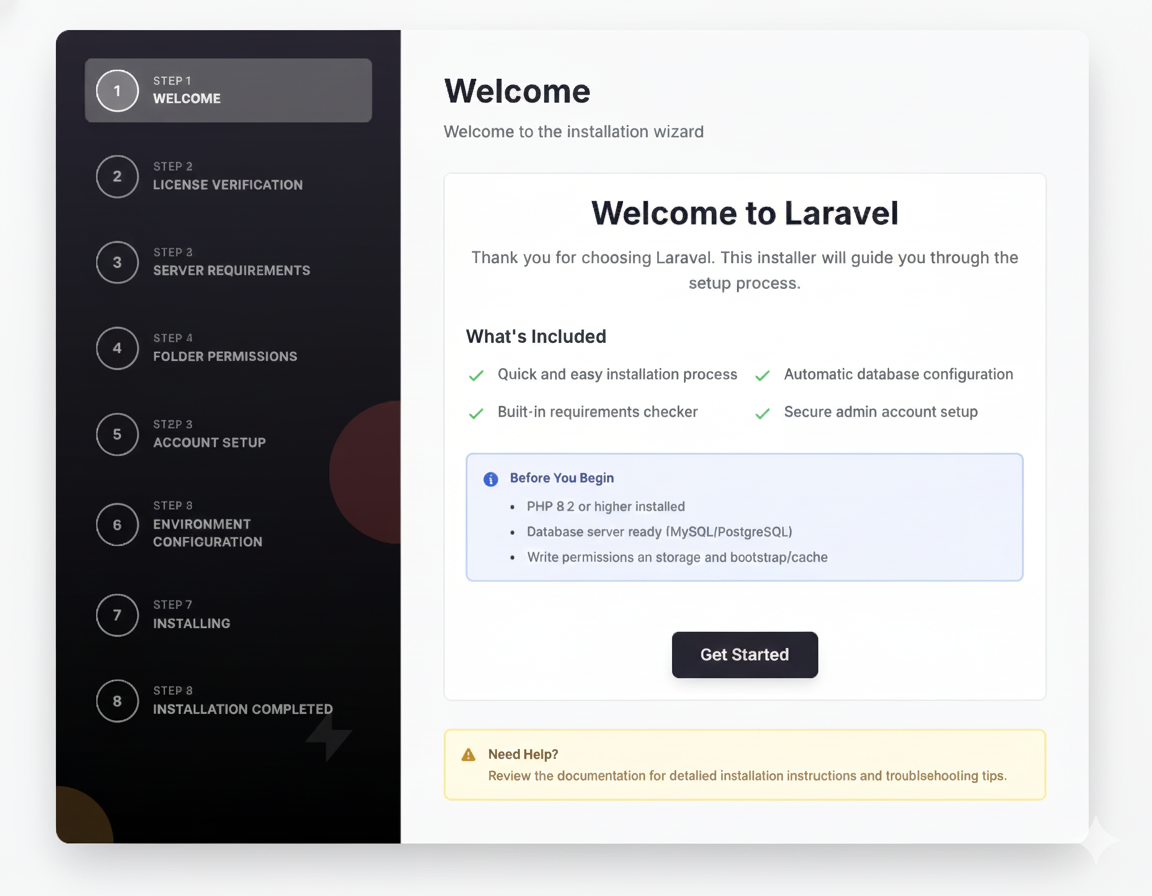
Displays a welcome screen with:
- Your app name and logo
- Custom welcome message
- Features list with checkmarks
- Requirements checklist
- Get Started button
#Configuration
Only needed if customizing the default content.
Publish config:
php artisan vendor:publish --tag=laravel-installer-welcome-configConfig file (config/installer-welcome.php):
return [ // Step position (default: 1) 'step_position' => env('WELCOME_STEP_POSITION', 1), // App branding 'app_name' => env('APP_NAME', 'Laravel Application'), 'app_logo' => env('APP_LOGO', null), // e.g., 'images/logo.svg' // Content 'title' => 'welcome::welcome.title', 'description' => 'welcome::welcome.description', // Features shown as bullet points 'features' => [ 'welcome::welcome.feature_1', 'welcome::welcome.feature_2', 'welcome::welcome.feature_3', 'welcome::welcome.feature_4', ], // Requirements notice 'show_requirements' => true, 'requirements_title' => 'welcome::welcome.requirements_title', 'requirements' => [ 'welcome::welcome.requirement_1', 'welcome::welcome.requirement_2', 'welcome::welcome.requirement_3', ], // Button text 'button_text' => 'welcome::welcome.get_started',];Environment variables:
WELCOME_STEP_POSITION=1APP_NAME="My Application"APP_LOGO=images/logo.svg#Add Your Logo
Place your logo in public/images/logo.svg and set:
.env:
APP_LOGO=images/logo.svgOr in config:
'app_logo' => 'images/logo.svg',#Customize Text
Publish translations:
php artisan vendor:publish --tag=laravel-installer-welcome-translationsEdit lang/en/welcome.php:
return [ 'title' => 'Welcome to :app', 'description' => 'Your custom welcome message here.', 'features_title' => 'What\'s Included', 'feature_1' => 'Feature one', 'feature_2' => 'Feature two', 'feature_3' => 'Feature three', 'feature_4' => 'Feature four', 'requirements_title' => 'Before You Begin', 'requirement_1' => 'Requirement one', 'requirement_2' => 'Requirement two', 'requirement_3' => 'Requirement three', 'get_started' => 'Get Started',];#Customize Features
Edit config to change features list:
'features' => [ 'welcome::welcome.feature_1', 'welcome::welcome.feature_2', 'Custom feature text without translation key', 'welcome::welcome.feature_3',],#Hide Requirements
Don't show requirements section:
'show_requirements' => false,#Customize Layout
Publish views:
php artisan vendor:publish --tag=laravel-installer-welcome-viewsEdit resources/views/vendor/welcome/livewire/steps/welcome.blade.php.
#Replace Default Welcome
This package replaces the installer's default welcome step when installed.
To use both (not recommended):
- Set different positions in config
- The default welcome is position 1
- Set this package to position 0 to appear first
#Next
- Install License Verification
- Install Account Setup
- Build your own: Plugin Guide